记一次宝塔迁移多个网站

教程

https://www.bt.cn/bbs/thread-42566-1-1.html

遇见的问题

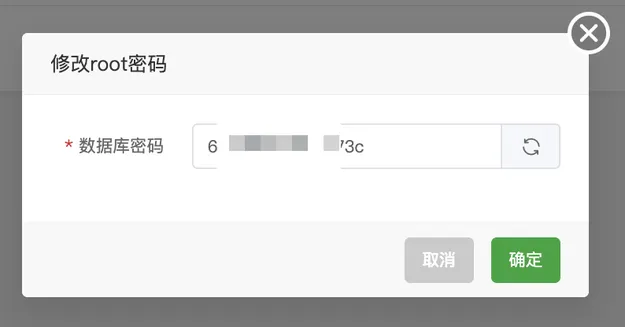
错误信息: 数据库[xxx]创建失败,数据库用户名或密码错误 !请尝试重置root用户密码后再进行操作

解决方案:

把旧服务器数据库密码复制并更新到新服务数据库上。

然后再执行迁移即可。

启动 Apache 失败,查看日志报错:AH00016: Configuration Failed

解决方案:

# 移动现有的网站配置文件夹
mv /www/server/panel/vhost/apache /www/server/panel/vhost/apache_bak

# 创建一个空的配置文件夹
mkdir /www/server/panel/vhost/apache

# 尝试启动 Apache
/etc/init.d/httpd start

问题后记:在宝塔论坛查看并没有找到问题解决方案;尝试重装 apache(快速安装、编译安装)均无法解决。最终还是手动 Google,把 https://stackoverflow.com/questions/46330468/ah00016-configuration-failed 文章丢给 Gemini 才给出的解决方案。

证书问题

迁移完成之后每个站点都已生成的站点 SSL 的记录。会不生效,这时候删除站点记录,重新创建站点,申请证书即可。

后记

感谢 Google Gemini、宝塔。

参考

  1. 宝塔一键迁移API版本 3.0版本教程
  2. AH00016: Configuration Failed
  3. Google Gemini
  4. 宝塔面板

宝塔 Linux 面板生成阿里云 OSS 绑定域名 HTTPS 证书

背景

阿里云上面的【数字证书管理服务】在个人测试证书由之前无限量,改为20个上限,根本不够用。然后产品升级,产品改为:个人测试证书(免费版)、个人测试证书(pro)。

对比项目个人测试证书(免费版)个人测试证书(pro)
费用免费68 元/张
证书服务周期仅支持3个月(即证书的有效期是3个月,过期后必须重新申请和安装证书,运维管理成本高)SSL签发后有效期为12个月,且提供托管服务(在证书即将过期时,自动提交新证书的申请),支持最长3年的服务周期
支持的证书类型DVDV
人工客服支持不支持支持
支持保护的网站域名类型仅支持保护一个单域名。不支持后缀为特殊词的域名申请免费证书。仅支持保护一个单域名。不支持后缀为特殊词的域名申请免费证书。

免费用完了,换个思路,既然再用宝塔在维护网站,也支持生成SSL证书,开整。

方案流程

涉及到4个产品:

  1. 宝塔Linux面板、
  2. 阿里云云解析DNS(其他也行)
  3. 阿里云对象存储 OSS
  4. 阿里云数字证书管理服务
继续阅读

使用Rclone把阿里云ECS文件同步到阿里云对象存储OSS

背景

需要把大约 25G 的图片、视频文件同步到阿里云对象存储OSS。

解决方案

1、安装 Rclone

> curl https://rclone.org/install.sh | sudo bash

2、配置 Rclone

> rclone config

No remotes found, make a new one?
n) New remote
s) Set configuration password
q) Quit config
n/s/q> n

Enter name for new remote.
name> webclown-net

Option Storage.
Type of storage to configure.
Choose a number from below, or type in your own value.
 1 / 1Fichier
   \ (fichier)
 2 / Akamai NetStorage
   \ (netstorage)
 3 / Alias for an existing remote
   \ (alias)
 4 / Amazon S3 Compliant Storage Providers including AWS, Alibaba, ArvanCloud, Ceph, ChinaMobile, Cloudflare, DigitalOcean, Dreamhost, GCS, HuaweiOBS, IBMCOS, IDrive, IONOS, LyveCloud, Leviia, Liara, Linode, Magalu, Minio, Netease, Outscale, Petabox, RackCorp, Rclone, Scaleway, SeaweedFS, Selectel, StackPath, Storj, Synology, TencentCOS, Wasabi, Qiniu and others
   \ (s3)
 5 / Backblaze B2
....
Storage> 4

Option provider.
Choose your S3 provider.
Choose a number from below, or type in your own value.
Press Enter to leave empty.
 1 / Amazon Web Services (AWS) S3
   \ (AWS)
 2 / Alibaba Cloud Object Storage System (OSS) formerly Aliyun
   \ (Alibaba)
 3 / Arvan Cloud Object Storage (AOS)
   \ (ArvanCloud)
 4 / Ceph Object Storage
   \ (Ceph)
...
provider> 2

Option env_auth.
Get AWS credentials from runtime (environment variables or EC2/ECS meta data if no env vars).
Only applies if access_key_id and secret_access_key is blank.
Choose a number from below, or type in your own boolean value (true or false).
Press Enter for the default (false).
 1 / Enter AWS credentials in the next step.
   \ (false)
 2 / Get AWS credentials from the environment (env vars or IAM).
   \ (true)
env_auth> 1

Option access_key_id.
AWS Access Key ID.
Leave blank for anonymous access or runtime credentials.
Enter a value. Press Enter to leave empty.
access_key_id> 8888888888888

Option secret_access_key.
AWS Secret Access Key (password).
Leave blank for anonymous access or runtime credentials.
Enter a value. Press Enter to leave empty.
secret_access_key> Xxxxxxxxxxxxxxxxxxxx

Option endpoint.
Endpoint for OSS API.
Choose a number from below, or type in your own value.
Press Enter to leave empty.
1 / Global Accelerate
   \ (oss-accelerate.aliyuncs.com)
 2 / Global Accelerate (outside mainland China)
   \ (oss-accelerate-overseas.aliyuncs.com)
 3 / East China 1 (Hangzhou)
   \ (oss-cn-hangzhou.aliyuncs.com)
 4 / East China 2 (Shanghai)
   \ (oss-cn-shanghai.aliyuncs.com)
 5 / North China 1 (Qingdao)
   \ (oss-cn-qingdao.aliyuncs.com)
 6 / North China 2 (Beijing)
   \ (oss-cn-beijing.aliyuncs.com)
...
endpoint> 6

Option acl.
Canned ACL used when creating buckets and storing or copying objects.
This ACL is used for creating objects and if bucket_acl isn't set, for creating buckets too.
For more info visit https://docs.aws.amazon.com/AmazonS3/latest/dev/acl-overview.html#canned-acl
Note that this ACL is applied when server-side copying objects as S3
doesn't copy the ACL from the source but rather writes a fresh one.
If the acl is an empty string then no X-Amz-Acl: header is added and
the default (private) will be used.
Choose a number from below, or type in your own value.
Press Enter to leave empty.
   / Owner gets FULL_CONTROL.
 1 | No one else has access rights (default).
....
acl>

Option storage_class.
The storage class to use when storing new objects in OSS.
Choose a number from below, or type in your own value.
Press Enter to leave empty.
 1 / Default
   \ ()
 2 / Standard storage class
   \ (STANDARD)
 3 / Archive storage mode
   \ (GLACIER)
 4 / Infrequent access storage mode
   \ (STANDARD_IA)
storage_class>

Edit advanced config?
y) Yes
n) No (default)
y/n> n

Configuration complete.
Options:
- type: s3
- provider: Alibaba
- access_key_id: 8888888888888
- secret_access_key: Xxxxxxxxxxxxxxxxxxxx
- endpoint: oss-cn-beijing.aliyuncs.com
Keep this "webclown-net" remote?
y) Yes this is OK (default)
e) Edit this remote
d) Delete this remote
y/e/d> y

Current remotes:

Name                 Type
====                 ====
webclown-net        s3

e) Edit existing remote
n) New remote
d) Delete remote
r) Rename remote
c) Copy remote
s) Set configuration password
q) Quit config
e/n/d/r/c/s/q> q
继续阅读

导出/备份 iPhone/iPad 照片到电脑

苹果电脑

  1. 打开「 照片.app 」;
  2. 选择照片;
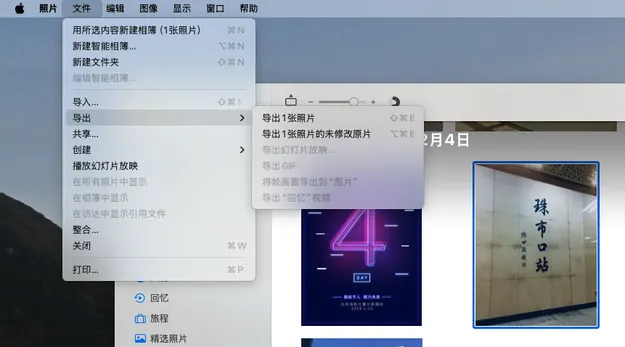
  3. 菜单栏:文件 – 导出 – 导出 n 张照片;
    • 导出照片
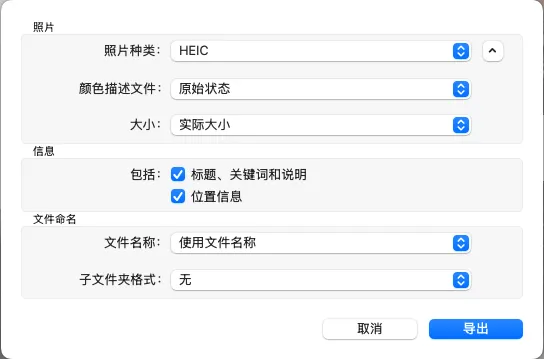
  4. 选择导出照片配置
    • 照片
      • 照片种类:HEIC
      • 颜色描述文件:原始状态
      • 大小:实际到小
    • 信息
      • 包括:标题、关键词和说明及位置信息
    • 文件命名
      • 文件名称:使用文件名称
      • 子文件夹格式:无
    • 选择导出照片配置
  5. 导出到指定文件夹
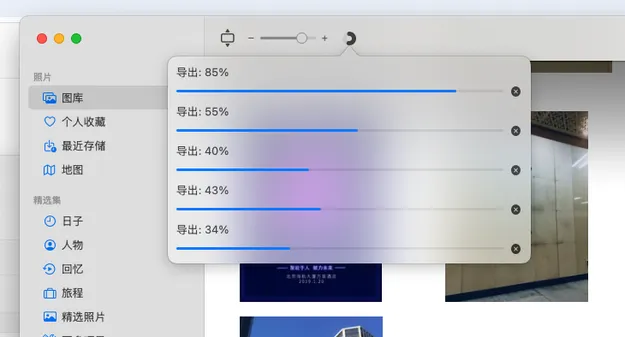
  6. 查看导出进度
    • 导出进度

Windows

可以是用 iTunes 导出。

下载 Windows 版 iTunes – 官方 Apple 支持 (中国)

其他平台(通用方法)

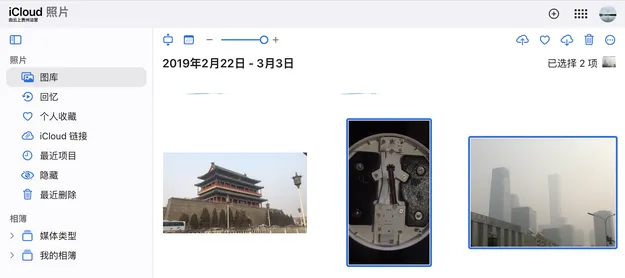
  1. 使用网页端登录
  2. 找到 「照片」,选择照片下载(每次最多可下载1000项,图片为:JPG,视频为:MOV)
    • iCloud 导出图片

HBuilderX – 发布App错误集合

[Error] Provisioning profile doesn’t support the Associated Domains

[Info] begin copyFile files to ipa…
[Info] begin replace files to ipa…
[Info] begin update mobileprovision to ipa…
[Info] begin outPut t_entitlements_full plist file…
[Info] begin outPut outPutEntitlements plist file…
[Info] begin verifyPlistFiles
[Error] Provisioning profile doesn’t support the Associated Domains
[Error] Provisioning profile doesn’t include the com.apple.developer.associated-domains
[Error] verifyPlistFiles failed
[Info] Package make result:Failed. Reason:

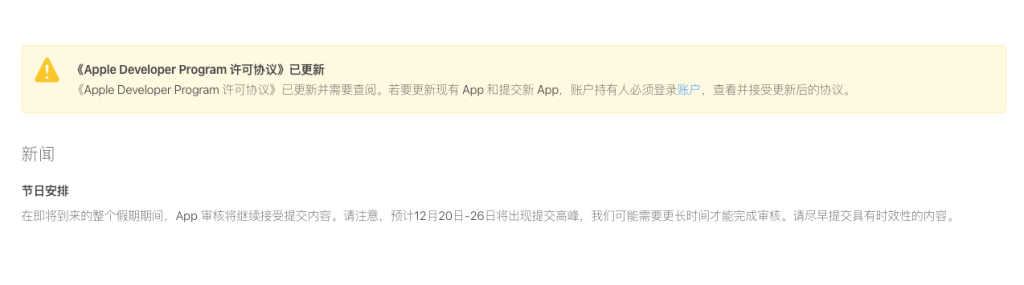
错误原因:《Apple Developer Program 许可协议》已更新

登录 App Store Connect 同意《Apple Developer Program 许可协议》,即可

为什么 中文 不 需要 空格

这篇文章探讨了为什么中文不需要空格的原因。主要观点如下:

中文是一种典型的表意书写系统,每个汉字表示一个音节或语素。中文文本由连续的汉字组成,不同的词之间没有用空格分隔。大多数中文词可以用一到两个汉字表示,词长较短且变化较小。因此,中文读者在阅读时容易预测词的长度,从而更快识别词的开始和结束位置,即中文词边界位置的不确定性较小。

中文词边界位置的不确定性较小,无需空格来标记词边界。

相比之下,英语单词往往由多个字母组成,且词长的变化较大,这使得英语读者较难预测每个单词的开始和结束位置,即英语词边界位置的不确定性较大。因此,英语倾向于使用空格以减少词切分的认知负担。

英语词边界位置的不确定性较大,需要空格来标记词边界。


总之,中文和英语采用不同的词边界标记方式,都是为了实现更经济高效的阅读。

原文:为什么 中文 不 需要 空格

ERROR [nuxt] [request error] [unhandled] [500] fetch failed

ERROR [nuxt] [request error] [unhandled] [500] fetch failed

 ERROR  [nuxt] [request error] [unhandled] [500] fetch failed
  at Object.fetch (node:internal/deps/undici/undici:11118:11)  
  at process.processTicksAndRejections (node:internal/process/task_queues:95:5)  
  at async sendProxy (./node_modules/.pnpm/h3@1.11.1/node_modules/h3/dist/index.mjs:1157:20)  
  at async ./node_modules/.pnpm/h3@1.11.1/node_modules/h3/dist/index.mjs:1962:19  
  at async Object.callAsync (./node_modules/.pnpm/unctx@2.3.1/node_modules/unctx/dist/index.mjs:72:16)  
  at async Server.toNodeHandle (./node_modules/.pnpm/h3@1.11.1/node_modules/h3/dist/index.mjs:2249:7)

触发此错误代码

demo.vue

async foo() {
  const resData = await useFetch(`/api/good/1`, {
    method: 'DELETE',
  });
}

nuxt.config.ts

export default defineNuxtConfig({
  nitro: {
    routeRules: {
      "/api/**": {
        proxy: `${env.NUXT_API_URL}api/**`,
      },
  }
}

临时解决方案

把请求方式改为 POST 请求。

async foo() {
  const resData = await useFetch(`/api/good/1`, {
    method: 'POST',
  });
}

网上有说是这些情况:

  1. 代理域名 httphttps 的问题,测试过不是这个问题,和域名无关。
    1. 排查域名请求日志,出现此问题时,请求日志没有记录,说明请求没有到达后端,是前端请求问题。
    2. 尝试改下请求方式,发现 POST 请求正常,DELETE 请求报错,也许是请求方式问题,但是不确定,先临时解决一下。
  2. 降级 h3@1.9.0 版本,降级后,问题依然存在。
  3. 降级 nuxt@3.10.3 版本,降级后,问题依然存在。

参考

  1. 基于nitro的Nuxt3服务端无法请求https,难道是我写错了?
  2. [nuxt] [request error] [unhandled] [500] using proxyRequest or sendProxy · Issue #376 · unjs/h3
  3. Nuxt v3.11.0 proxyRequest in server api routes makes nitro crash if proxy server is down · Issue #26318 · nuxt/nuxt

印象笔记导出Markdown

解决方案

  1. 确认印象笔记版本 9.5.10

  2. 导出笔记:

    1. 方式一:全选笔记导出为 .enex 格式。
    2. 方式二:选择笔记本导出为 .enex 格式。
  3. .enex 格式转换为 .md 格式

    方式一:

    使用 evernote2md 工具将 .enex 格式转换为 .md 格式。

    evernote2md 我的笔记.enex ./output
    

    方式二:yarle

  4. done。

获取印象笔记 9.5.10 版本安装包:

链接:https://pan.quark.cn/s/dc30a92ff0c6

提取码:jVuH

背景

已经不在使用印象笔记有几年,打算把笔记导出来,以备后用(会吗?)。

印象笔记为国内版,国际版为 Evernote。国内版的笔记从 9.5.10 版本之后是无法导出为 .enex 格式的,只能导出 .notes.html 格式,.notes 还是加密的(encoding="base64:aes"),国际版可以正常导出 .enex 格式。 evernote2md 可以将 .notes 格式转换为 .md 格式。

  • 方案1:.notes + evernote2md 🙅
  • 方案2:.html + evernote_move 🙅
  • 方案3:.enex + evernote2md
  • 方案4:.enex + yarle

方案4 yarle 优点,支持导出多种软件使用的Markdown格式(更多),如:

  • Obsidian
  • LogSeq
  • Tana
  • Heptabase

参考

  1. wormi4ok/evernote2md – Github
  2. akosbalasko/yarle – Github
  3. 印象笔记导出格式更新,enex变为notes,恶心行为+1
  4. 印象笔记导出HTML再转markdown的方法_印象笔记导出markdown-CSDN博客

在prettier3项目中替代pretty-quick

解决方案

.husky/pre-commit 中添加以下内容

# 获取暂存区的文件列表
FILES=$(git diff --cached --name-only --diff-filter=ACMR | sed 's| |\\ |g')
[ -z "$FILES" ] && exit 0

# 美化所有暂存区的文件
echo "$FILES" | xargs ./node_modules/.bin/prettier --ignore-unknown --write

# 将修改/美化的文件添加回暂存
echo "$FILES" | xargs git add

背景

在 prettier v3.x 版本的项目中,使用 pretty-quick 会报错:

.../isSupportedExtension.js:12
  ..._prettier.resolveConfig.sync(file, {
                             ^
TypeError: _prettier.resolveConfig.sync is not a function

可以降低 prettier 版本到 2.x 来解决这个问题,但是项目里面额外使用了 tailwindcss,而 tailwindcss 依赖的 postcss 依赖的 prettier 版本是 3.x,所以降低 prettier 版本不是一个好的解决方案。

参考

  1. Pre-commit Hook · Prettier
  2. pretty-quick will break with prettier v3 · Issue #164 · azz/pretty-quick
  3. Editor Setup – Tailwind CSS
  4. tailwindlabs/prettier-plugin-tailwindcss: A Prettier plugin for Tailwind CSS that automatically sorts classes based on our recommended class order.